

Security Baselines
Configuration drifts back
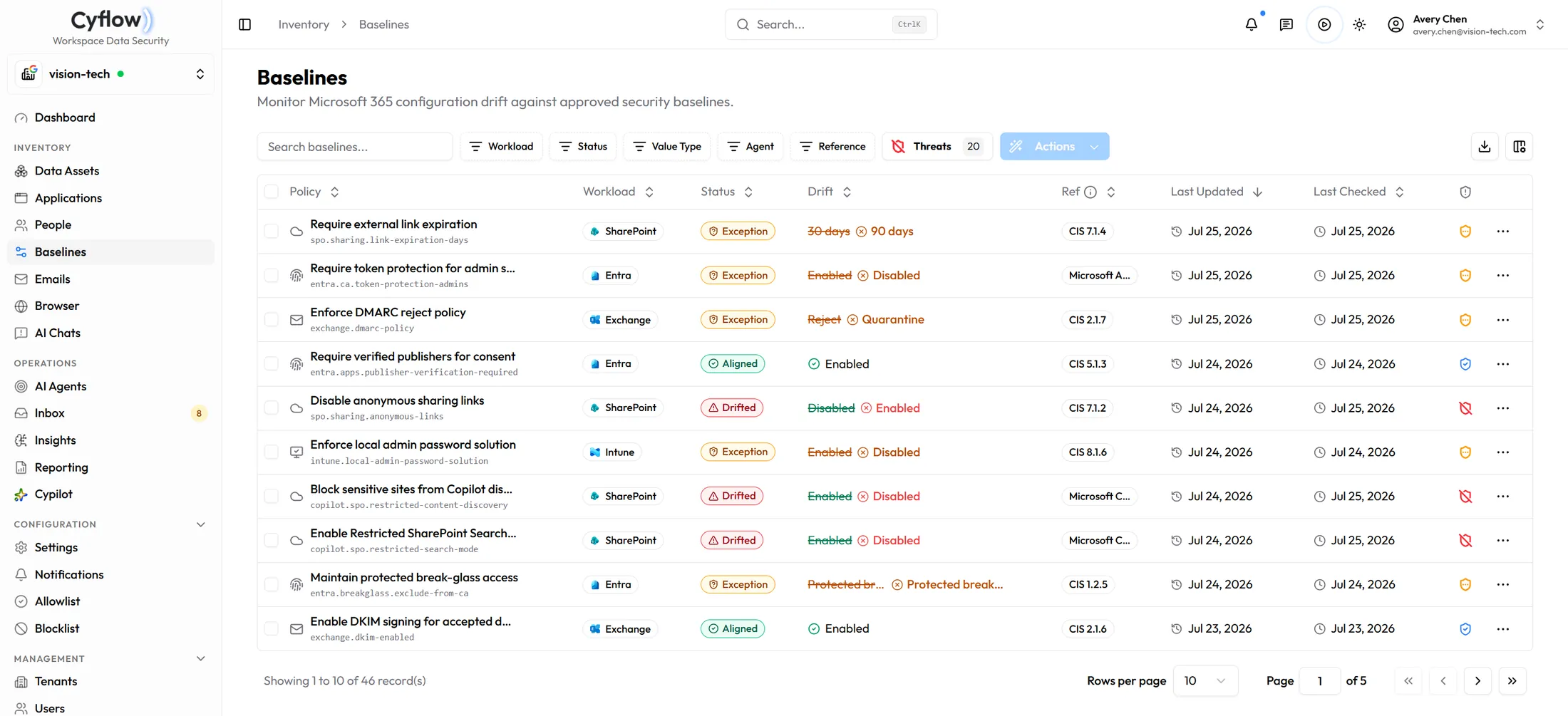
A setting gets loosened for one project and never gets put back. Baselines hold the state you decided on, compare it against live Microsoft 365, and show every difference with what it was, what it is now, and the CIS control behind it.
Why it matters here
Drift widens what AI can reach
Configuration sits upstream of everything else. A sharing default that flips open does not produce one finding — it produces thousands, one file at a time, through people doing their jobs normally.
Sharing defaults
Anonymous link sharing re-enabled at tenant level means the next person to share a file gets an Anyone link without choosing one. The oversharing arrives quietly, through ordinary work.
What an assistant may search
Restrictions on content discovery decide how much of the tenant Copilot can reach for an answer. Relaxed during a rollout and never restored is the most common way exposure grows after go-live.
Identity posture
Conditional access and MFA coverage decide who reaches the tenant at all. A gap here sits upstream of every other control on this page, including the ones already working.
How it runs
Compare, decide, put it back
Coverage is what the policy catalog holds rather than every setting Microsoft ships, and it grows as the catalog does. What is in the catalog is checked against live tenant state on every scan.
01
Set the desired state
Start from the catalog of desired-state policies, adjust it to the decisions your organization actually made, and carry the same baseline across managed tenants instead of rebuilding it per client.
02
Scan against live configuration
Each policy comes back aligned, drifted or excepted, with its previous and current value and its CIS reference. Settings you diverge from deliberately go on the allowlist or get marked safe, so they stop reappearing as noise.
03
Remediate at the depth you trust
Dry-run shows what would change without changing it. Request sends the change for approval. Apply makes it. The mode is set per policy, and the record of what changed stays behind either way.
Scope and safety
What it checks, and what it will change.
Which settings are covered?
The ones in the policy catalog — the settings Cyflow maintains a desired state and a remediation path for. It is deliberately not a claim to cover every setting in Microsoft 365; coverage grows as the catalog does.
Is this a CIS certification?
No. Policies carry CIS references so a finding traces back to a recognized control, but the output is a drift report and a remediation record — not a certification or an audit opinion.
Will it change our tenant without asking?
Only if you set it to. Remediation runs as dry-run, request or apply, and the first two change nothing until a person decides.
What about settings we diverge from on purpose?
Mark them safe or add them to the allowlist. They stay visible as a deliberate exception rather than returning as drift on every scan.
Does this work across multiple tenants?
Yes. A baseline can be applied to the managed tenants you select, which is the point for an MSP holding the same standard across a book of clients.
Decide the state once
The cheapest place to fix exposure
Book a demo and we will run a baseline scan — the drift, the CIS references behind it, and a dry-run of the fix.