

AI Data Security
Secure the data AI can reach
One platform for every AI agent and assistant in a Microsoft 365 or Google Workspace tenant. Copilot answers from data the tenant already overshares, browser AI tools take whatever people paste, and connected AI apps hold delegated scopes nobody reviewed. Cyflow covers all three in one console, and remediates what it finds.
- Data assetsReading tenantScanning
- ApplicationsReading tenantScanning
- Microsoft CopilotReading tenantScanning
- Browser ExtensionsReading tenantScanning
- Browser ActionsReading tenantScanning
The starting position
AI does not create permissions. It amplifies them.
Access grants already exist in the tenant — often misconfigured. Every OAuth consent, every Anyone link, every extension install added another path into the same data, long before AI arrived to read it.
Consent nobody revisited
A user can approve an app with organization-wide scope without an admin in the room. The grant outlives the trial, the project, and often the person.
Links that outlive their reason
A file shared with Anyone — or with the whole organization — stays that way in OneDrive, SharePoint and Drive. Copilot will summarise it for anyone who can reach it, external or internal, exactly as designed.
Extensions that read every page
AI assistant extensions run in Chrome and Edge with permission to read page contents. A contract pasted into one is a copy outside the tenant.
Platform
Every way AI reaches company data
A single Workspace connection covers every channel below — along with the people whose access turns into AI context.
01
Microsoft Copilot
Copilot answers with whatever the person asking can already reach, so its transcripts are a running record of what the tenant exposes. Cyflow classifies each conversation by sensitivity and data exposure, and filters the ones touching regulated data.
AI Chats — Copilot conversations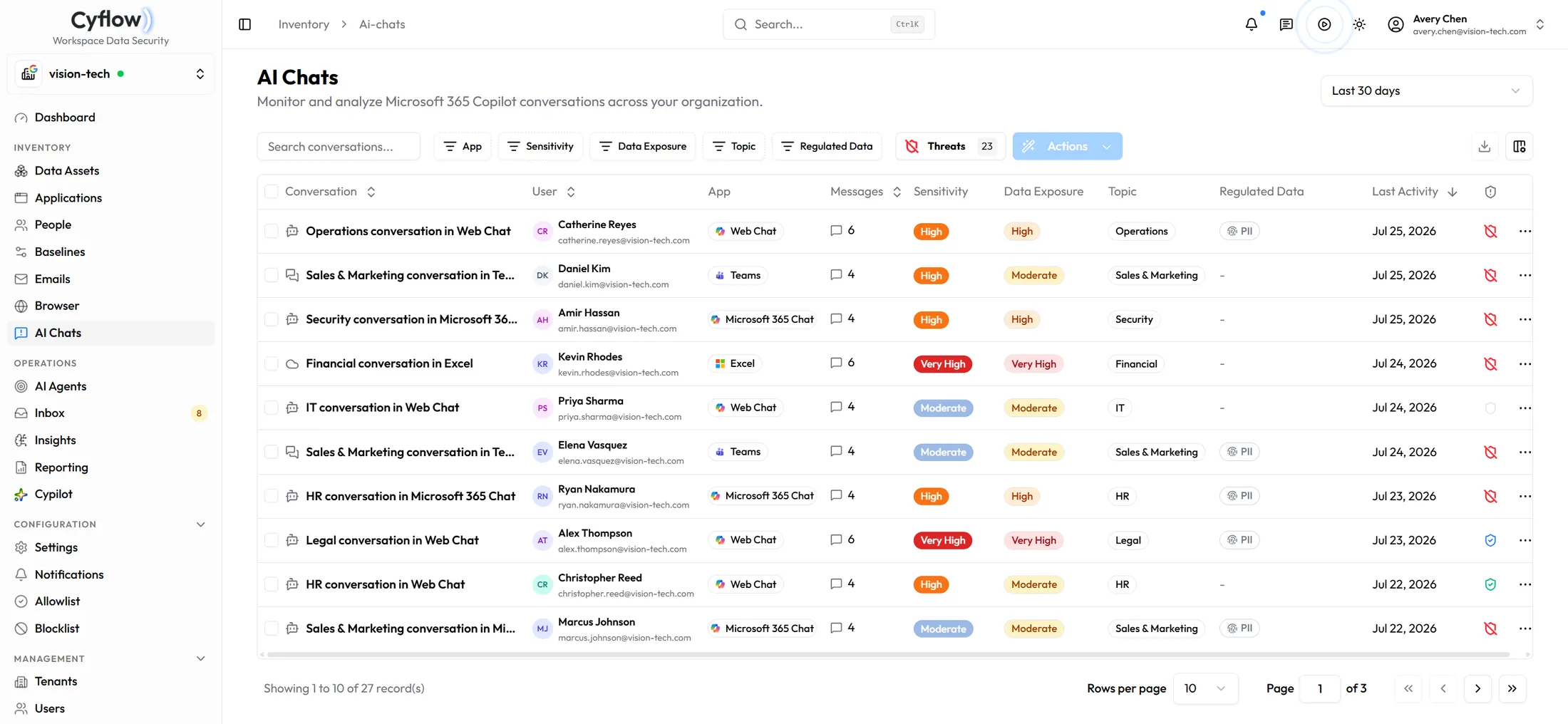
02
Browser AI tools
AI reaches the browser as extensions that read the page — known assistants like ChatGPT, Claude and Gemini, and unvetted extensions — and as tabs people paste into. Cyflow inventories and rates the AI extensions, and blocks a sensitive paste or upload to an AI assistant or a private destination such as WhatsApp Web before it lands.
Browser — Paste & Upload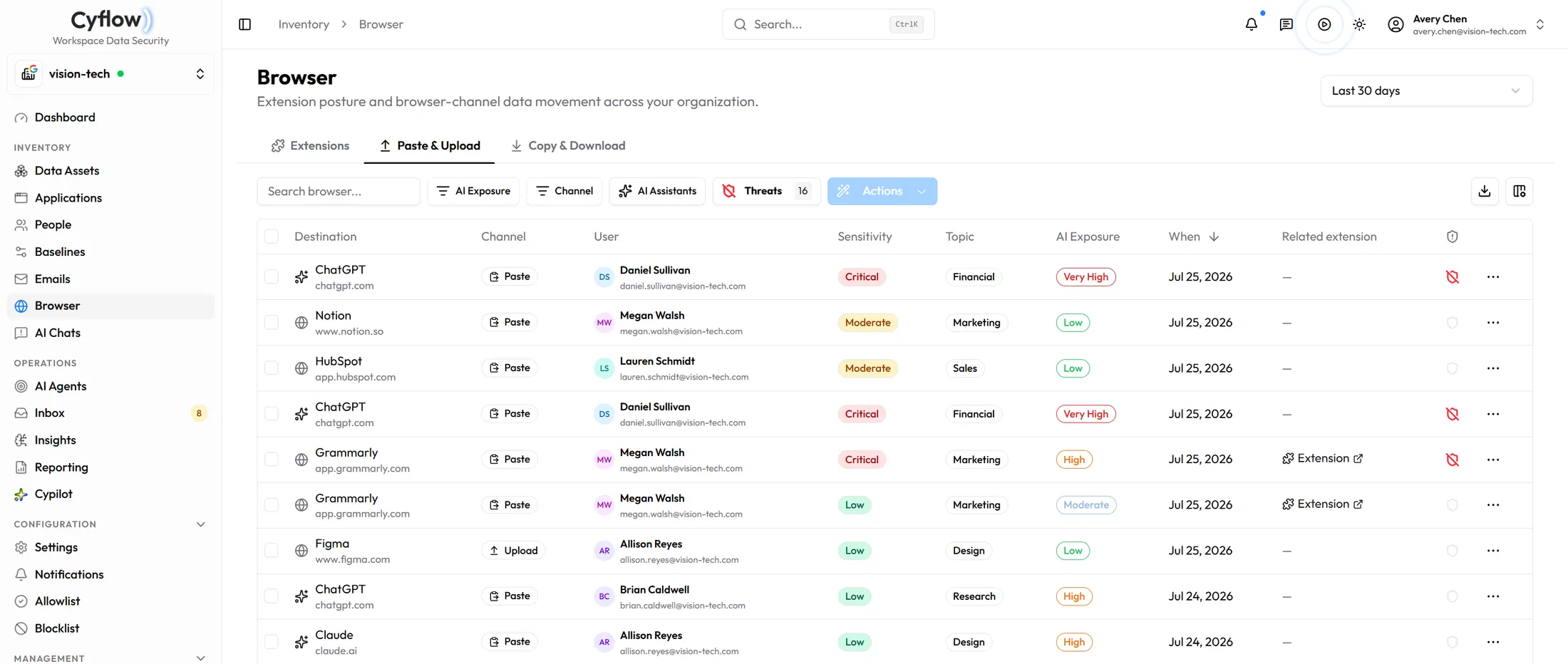
03
Connected AI apps
An AI app holding organization-wide delegated scope reads mail, files or calendars for everyone it covers, with no further prompt. Cyflow scores each grant on AI exposure, data access and publisher trust, then revokes the ones that fail review.
Applications — OAuth grants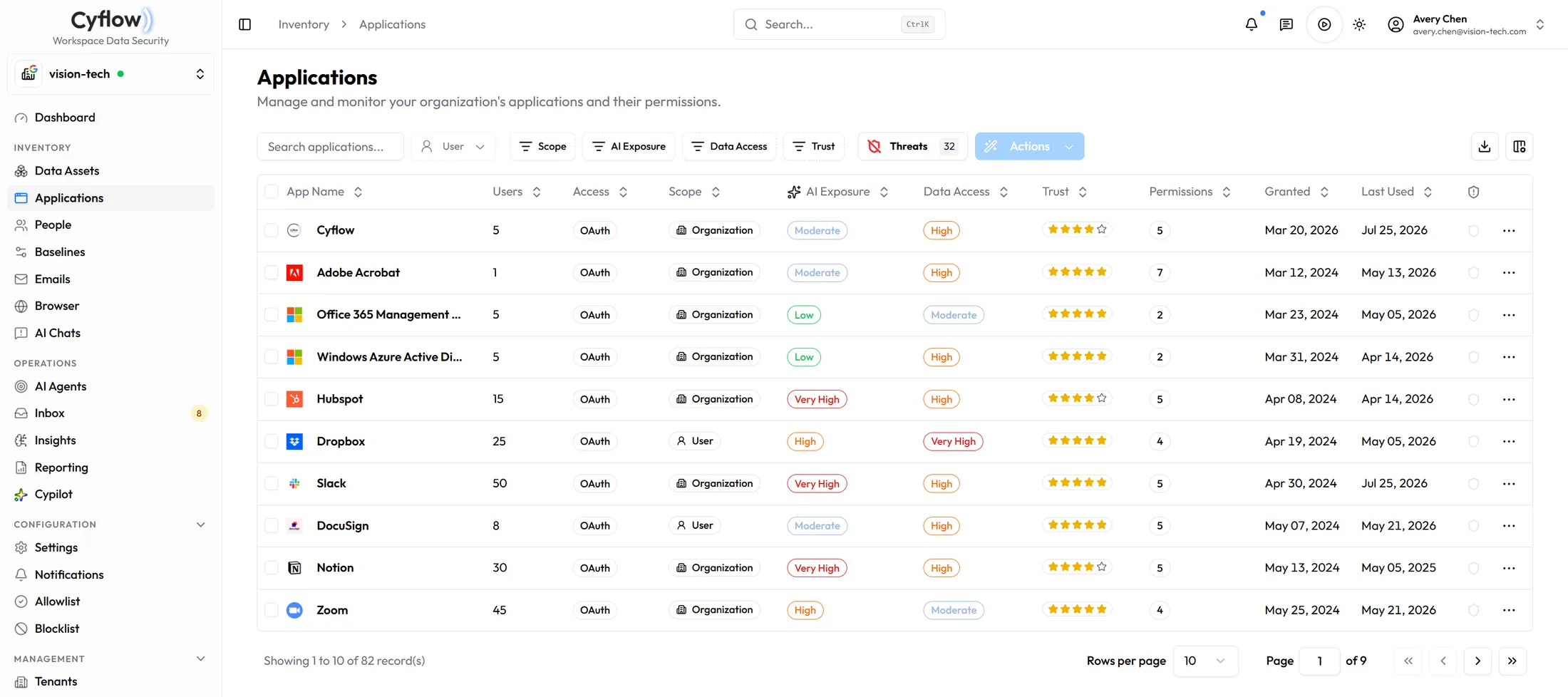
04
Files and sharing
Sharing state sits beside the sensitivity label on every file: Anyone, external, organization-wide, group, or private. Remediation agents narrow the ones that should never have been open, starting with Anyone links on regulated content.
Data Assets — sharing status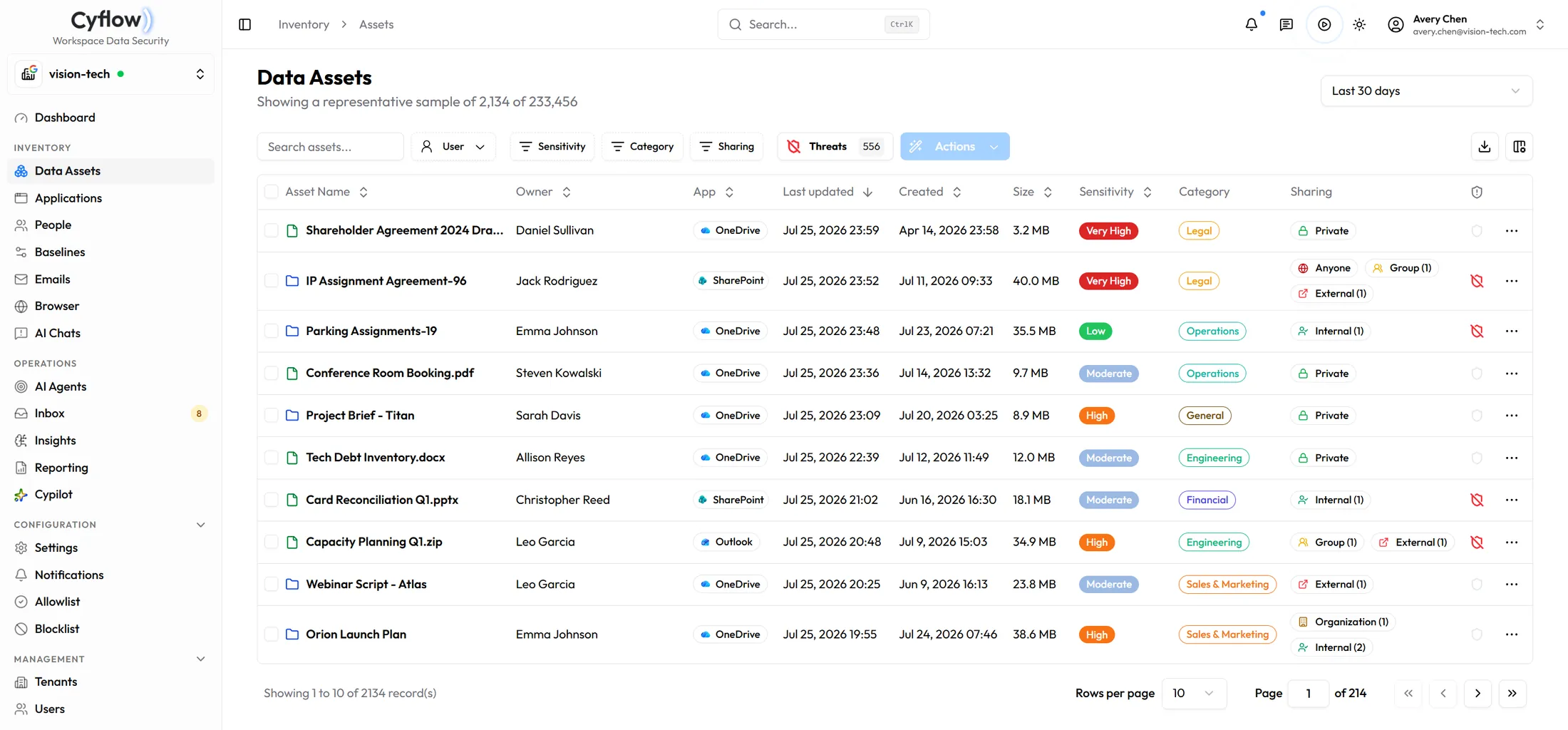
05
Outgoing mail and personal accounts
An attachment to a personal gmail.com address looks the same on the way out as one to a customer. Cyflow classifies outgoing mail, marks external recipients, and pulls back overshared links. Secure Share covers the OneDrive attachment side.
Emails — Outgoing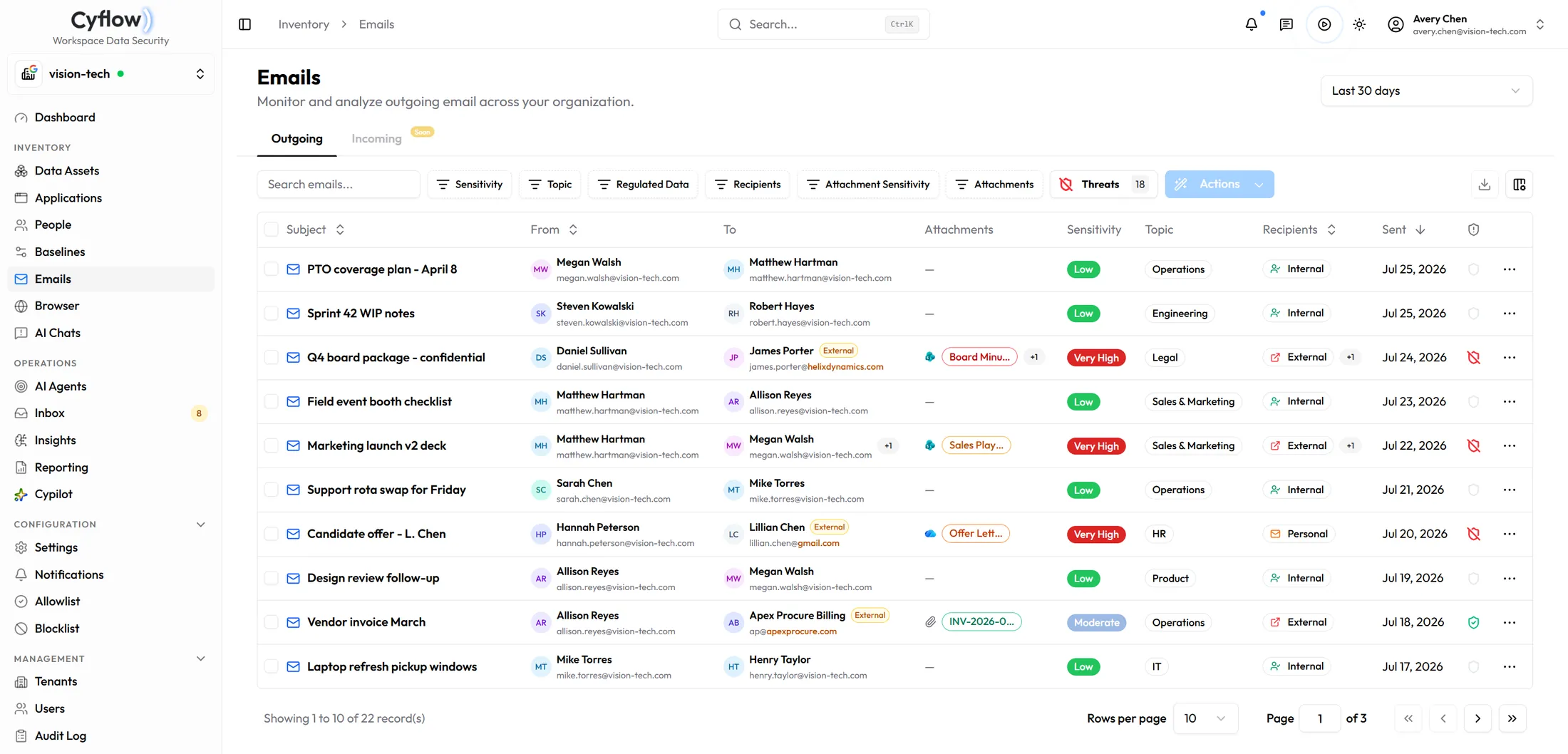
06
Tenant configuration
Anonymous sharing links get re-enabled. Copilot content-discovery restrictions get switched off. Baselines hold a desired state per workload and show each drift with its CIS reference and what changed.
Baselines — configuration drift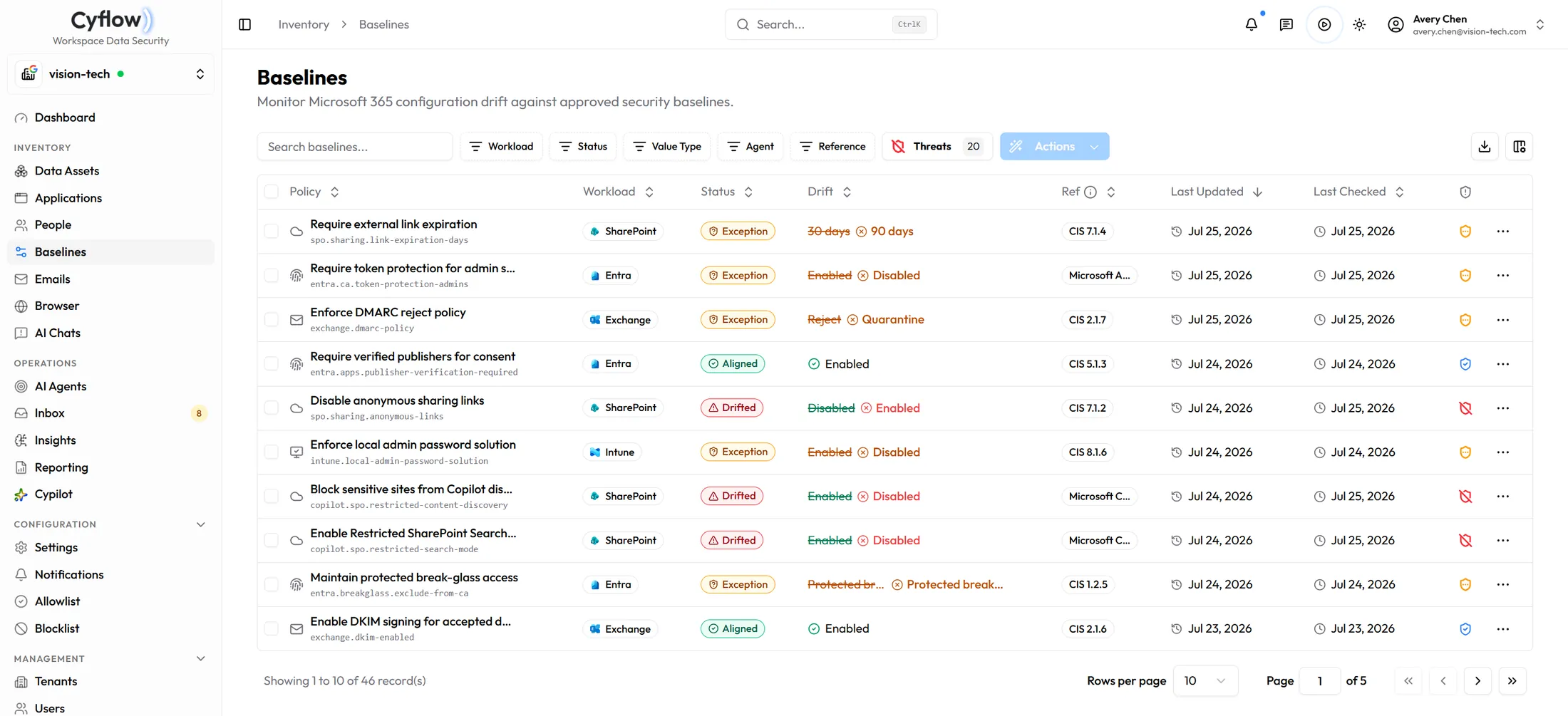
07
People — employees and contacts
Sensitive-data exposure, blast radius and identity sit on the same row as the person who holds them — so you see who can reach what, and which AI context that access becomes. When someone overshares a file or pastes sensitive content into an AI tool, Cyflow educates the owner in that moment instead of waiting for the next training cycle.
People — Employees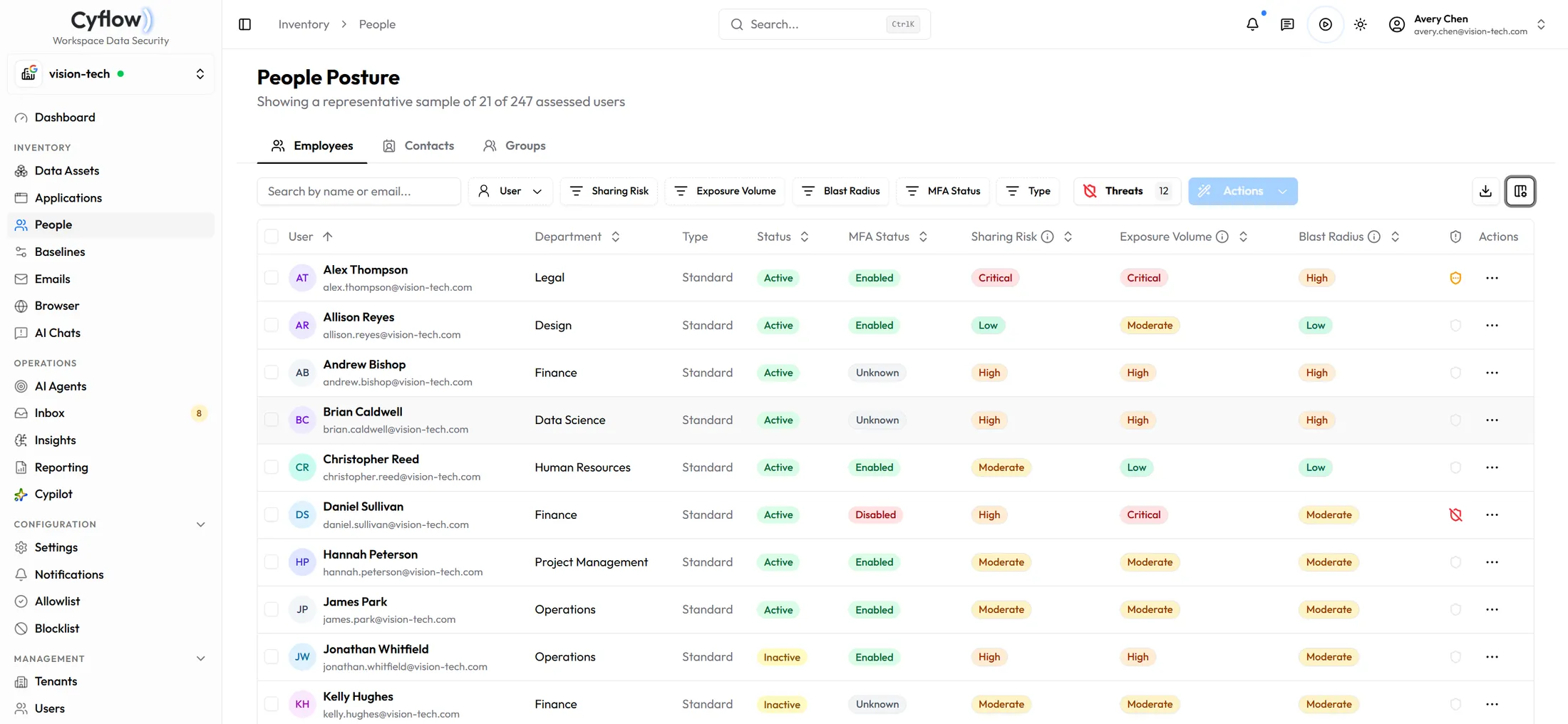
Operations
Connect once, then decide how far agents go
Cyflow reads Microsoft 365 and Google Workspace through their own APIs. What an agent is allowed to do after it finds something is a setting you hold, per agent and per tenant.
Coverage
Microsoft 365 and Google Workspace
Microsoft Graph covers the Microsoft side. Domain-wide delegation covers Drive, Shared Drives, Gmail and the directory on Google. Copilot conversations are read on the Microsoft side; on Google, Cyflow reports what Gemini would be able to reach rather than what anyone typed into it.
 OneDrive
 SharePoint
 Entra ID
 Outlook
 Copilot
 Google Drive
 Google Admin
 Gmail
Gmail Gemini
 Teams
Teams Slack
Slack Dropbox
 Google Chrome
 Microsoft Edge
Deployment
No endpoint agent
Connecting a tenant is an admin consent and a set of scopes. Nothing installs on a laptop — with one exception, the Chrome and Edge extension that covers the browser channel.
OAuth consent · read scopes first · write scopes when you enable remediation
Authority
Monitor, ask, or resolve
Each agent carries one of three authorities. Monitor records the finding and stops there. Request Approval sends it to the inbox and waits for a person. Auto-remediate applies the fix and writes who it ran as into the audit log.
- Monitor
- Request Approval
- Auto-remediate
Education
Teach where they touch the data
Employee education is optional. When you turn it on, Cyflow notifies the owner at the moment of overshare, paste, or risky grant — explaining what happened and how to fix it, instead of waiting for the next training cycle.
Optional · In-context · Employee notified at the exposure, in real time
Lifecycle
Prepare before rollout. Govern after.
AI inherits the access already present in the tenant. Cyflow covers the adoption arc — readiness before Copilot or Gemini go live, governance once they are in use, and continuous exposure management as permissions and configuration drift.
Before
AI Readiness
Backward Remediation · AI Readiness Report
After
AI Governance
Executive Report · Compliance Report
Ongoing
Exposure Management
Employee Education · Automatic Remediation
Licensing
Copilot seats nobody uses
Purchased against assigned against actually active. Unused Copilot seats are matched to conversation activity, so the ones worth reclaiming are named rather than estimated.
Automatic assessment post onboarding
Getting started
Scan, classify, then leave it on auto-pilot
Onboarding is an admin consent. After that, Cyflow scans what AI can reach, classifies the exposure, and holds the position with the authority you set.
01
Connect and scan
Sign in with Microsoft 365 or Google Workspace. Cyflow inventories files, people, OAuth apps, Copilot conversations, browser activity, and configuration — nothing installs on a laptop except the optional browser extension.
02
Classify and set policy
Sensitivity and sharing state land on every asset. Pick agent presets, then set each one to Monitor, Ask, or Resolve so remediation stays inside the authority you hold.
03
Auto-pilot for drift
Agents watch for oversharing in OneDrive, SharePoint, Drive and Email, Shadow AI grants, and baseline drift, remediate what you pre-approved, and leave everything else in the approval inbox with a report each period.
After the finding
A finding is not a fix
Detection is the cheap half. Agents carry a finding through to a changed permission, and leave the record of who approved it.
01
Agents run in the mode you pick
Presets run from monitor-only through to strict remediation. In between, critical findings remediate automatically while medium and low stay in monitoring.
02
Approvals wait for a person
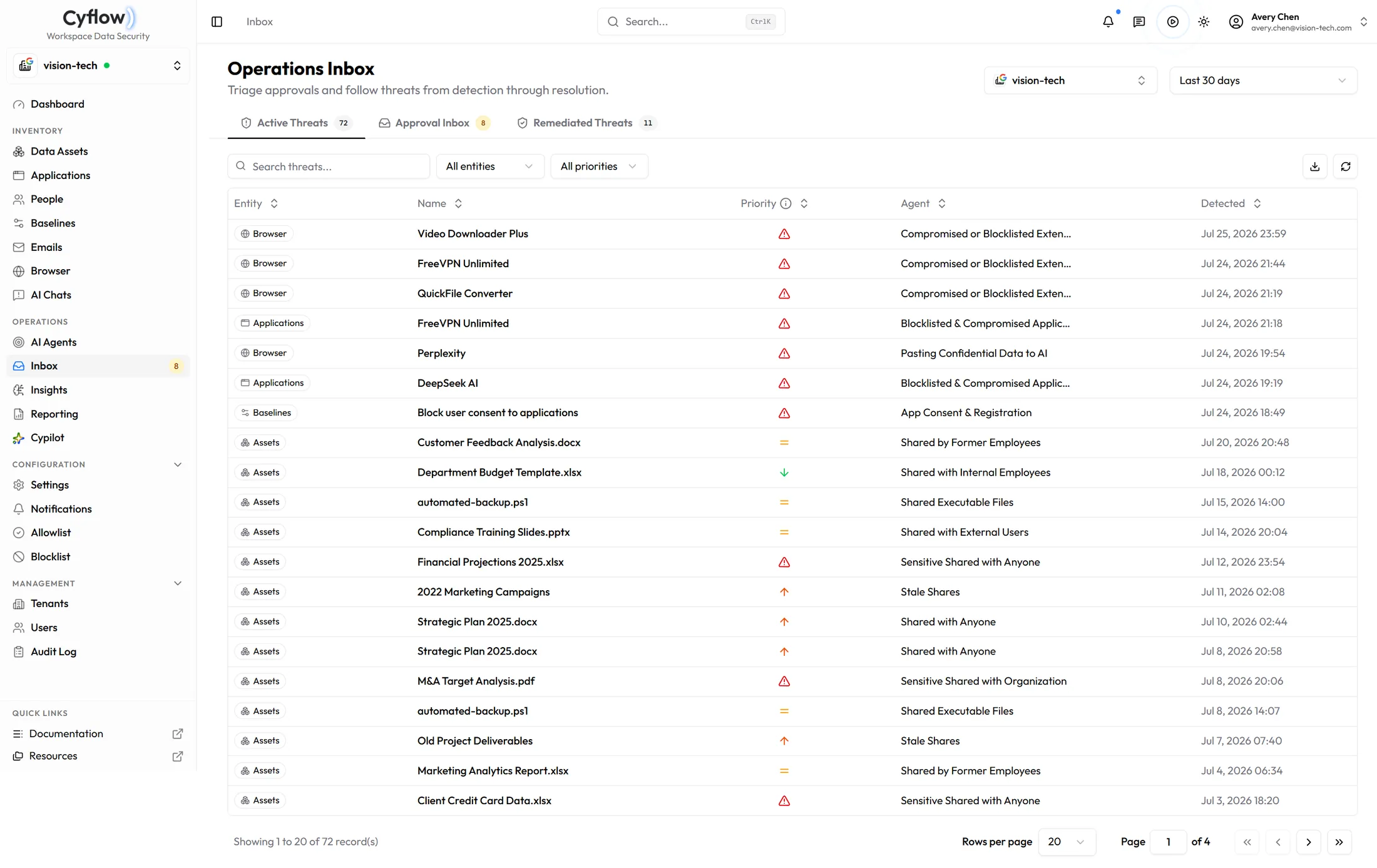
Anything an agent wants to change that you have not pre-approved sits in the approval inbox with the entity, the agent that raised it, and when it was detected.
03
The report leaves the console
Executive PDF, summary or detailed, carrying your own logo.
Questions, answered
AI Data Security in practice.
What is AI Data Security?
AI Data Security protects sensitive organizational data across the AI adoption lifecycle. It combines readiness, ongoing governance, exposure management, education, and remediation with the data, identity, application, and permission controls AI inherits.
How does Cyflow expose the human blast radius behind AI risk?
Cyflow connects employees, external contacts, groups, permissions, sensitive assets, applications, and AI destinations so teams can see who can reach the data, which AI systems inherit that access, and how far an exposure can spread.
How does Cyflow govern sensitive data in AI chats and applications?
Cyflow monitors and classifies Microsoft Copilot conversations for sensitive-data exposure, scores and revokes OAuth-connected AI apps, and surfaces the oversharing in OneDrive, SharePoint, Drive and Email — or the configuration drift — that expands what AI can reach.
What happens when an employee accidentally exposes sensitive data?
Cyflow identifies the data path, notifies the employee or data owner with a clear explanation of what is at risk and how to fix it, and drives remediation—revoke the grant, narrow the share, or correct the drifted baseline—with an audit trail of who approved the change.
Which AI channels are part of the exposure story?
Microsoft Copilot conversations, OAuth-connected AI apps, browser paste and upload to ChatGPT and Claude, private destinations such as WhatsApp Web and Gmail, oversharing across OneDrive, SharePoint, Teams and Email, and Microsoft 365 configuration drift.
Will the agents change things without asking?
Only if you set them to. Each agent runs as Monitor, Ask, or Resolve. The default presets stay on monitor or monitor-plus-alerts. Remediation is opt-in per agent, and anything you have not pre-approved waits in the approval inbox.
Get the tenant ready
Start with what AI can already reach
Book a demo and we will walk the console channel by channel. Or start with the assessment and keep the report.