

AI Governance
Govern Copilot after it goes live
Readiness gets you to launch. Governance is every day after it: conversations classified by sensitivity and regulated data, new AI apps reviewed as they appear, oversharing in OneDrive, SharePoint and Email caught as it happens, configuration drift caught the same way, and a report that proves the position held.
After rollout
What needs watching once AI is in use
An assistant in daily use keeps changing the surface around it. New grants appear, links get shared, settings drift, and the transcripts pile up. These are the six that move.
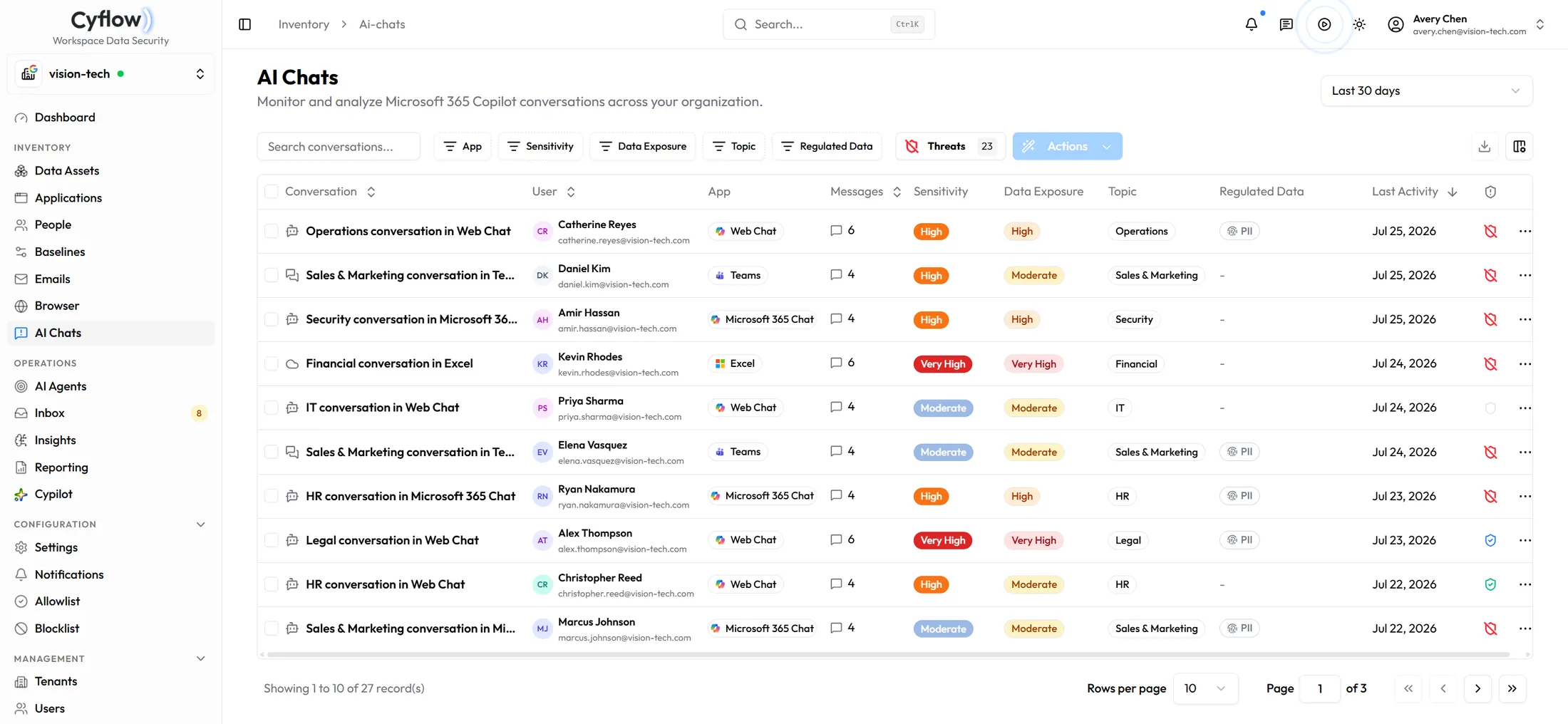
Copilot conversations
Each conversation classified by sensitivity and data exposure, filterable by topic and regulated data, so the ones worth reading are the ones you see.
New AI apps as they appear
Every OAuth grant that shows up is scored on AI exposure, data access and publisher trust, and can be revoked from the table it appears in.
Oversharing as it happens
Sharing state sits beside the sensitivity label on every file in OneDrive and SharePoint, and agents narrow the Anyone and organization-wide links on regulated content rather than listing them. Email coverage pulls back overshared links already on the way out.
Where the browser sends data
Paste and upload to AI assistants and personal accounts are recorded with destination, channel and sensitivity, and can be blocked before they land.
Configuration drift
Baselines hold a desired state per workload, so a re-enabled anonymous sharing setting surfaces with its CIS reference and its previous value.
Copilot seats nobody uses
Purchased against assigned against actually active, matched to conversation activity so the seats worth reclaiming are named rather than estimated.
How it runs
Detect, decide, then prove it
Governance is only credible if somebody can show what happened. Each finding carries the agent that raised it, the authority it ran under, and the person who approved the change.
01
Detect
Agents watch each channel continuously — conversations, grants, sharing, browser destinations and baselines — and raise what crosses the thresholds you set.
02
Decide
Every agent carries one of three authorities. Monitor records the finding and stops. Request Approval sends it to the inbox and waits for a person. Auto-remediate applies the fix. Nothing you have not pre-approved changes on its own.
03
Prove
Executive, compliance and remediation reports export as PDF and can carry your own logo, and the audit log records what the agent changed and who it ran as.
How governance behaves
What the agents do, and who decides.
Does Cyflow read the content of Copilot conversations?
Conversations are classified for sensitivity and data exposure so that regulated-data topics can be filtered and reviewed. Export of conversation detail is gated to administrators.
Who approves a remediation?
You do, unless you have delegated it. Each agent runs as Monitor, Request Approval, or Auto-remediate, set per agent and per tenant. Anything under Request Approval waits in the approval inbox with the entity, the agent that raised it, and when it was detected.
Does this govern ChatGPT and Claude as well as Copilot?
Through the channels they actually use in the tenant. The browser extension covers paste and upload to those assistants, and the applications inventory covers them when they hold an OAuth grant. Cyflow does not manage those vendors' own accounts or settings.
Can we govern Google Gemini the same way?
Yes. Conversation monitoring for Gemini works the same way as Microsoft 365 Copilot when Gemini is in use. On Google Workspace, Cyflow also covers Drive, Shared Drives, Gmail and the directory.
What can we hand to an auditor?
The executive and compliance reports as PDF, plus the remediation record behind them: what was found, what changed, under which authority, and who approved it.
Keep the position
Rollout is the start, not the finish
Book a demo and we will run the governance loop — detection, the approval inbox, and the report that comes out the other end.