

The Cyflow platform
One platform for AI security in Microsoft 365
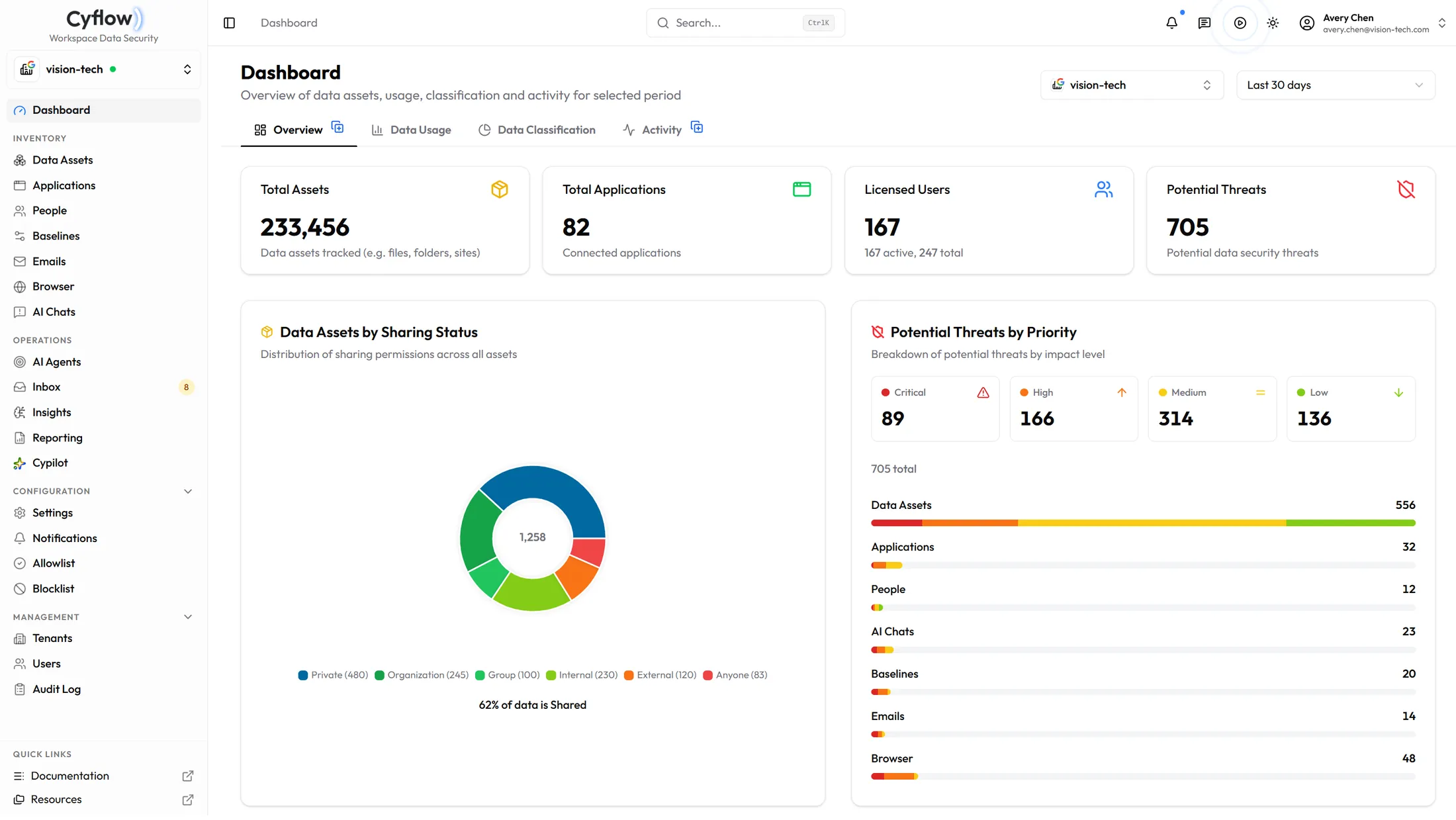
Copilot conversations, browser AI tools, connected AI apps, files, outgoing mail, people and tenant configuration — inventoried, classified, and remediated from the same console. Connecting a tenant is an admin consent; nothing installs on a laptop except the optional browser extension.
Reads the tenant you already run
- Microsoft 365Graph and Entra
- Microsoft CopilotConversation classification
- Connected AI appsOAuth consent grants
- Browser AI toolsChrome and Edge extension
- Google WorkspaceDrive and Gmail inventory
Every channel, one console, and the same view across every tenant you manage.
Before and after
What changes once Cyflow reads the tenant
AI inherits and amplifies grants that already exist in the tenant — often misconfigured. Each pair below is one path into the same data — how it behaves on its own, and what the console does with it.
01
Connected AI apps
Before AI
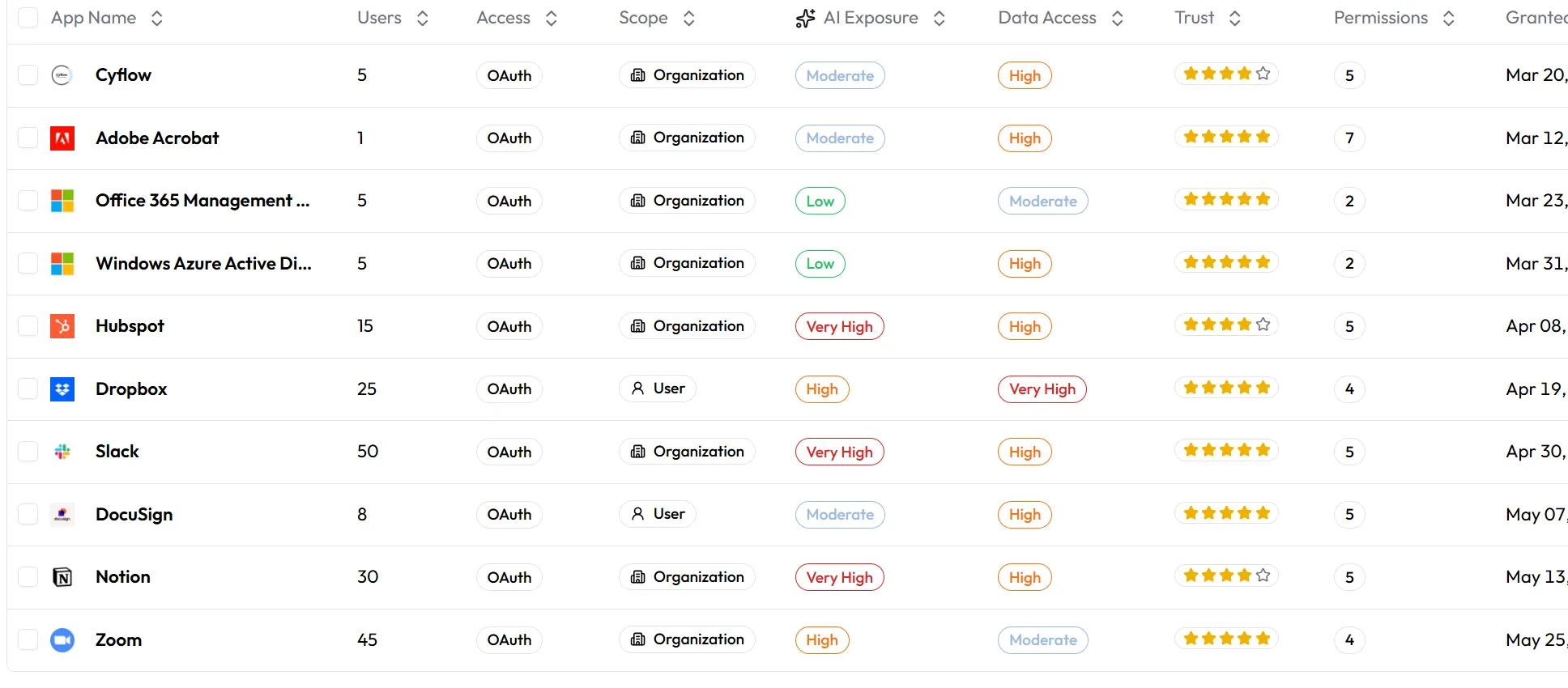
A user approves an AI app with organization-wide delegated scope. The grant reads mail, files or calendars for everyone it covers with no further prompt, and it outlives the trial, the project, and often the person.
With Cyflow
Every OAuth grant is inventoried and scored on AI exposure, data access and publisher trust. Revoking happens in the same table you found it in.
02
Files and sharing
Before AI
A file shared with Anyone stays shared with Anyone. Copilot will summarise it for whoever can reach it, exactly as designed.
With Cyflow
Sharing state sits beside the sensitivity label on every file in app — Anyone, external, organization-wide, group, or private. Remediation agents narrow the links that should never have been open, starting with Anyone links on regulated content.
03
Microsoft Copilot
Before AI
Copilot is live and nobody can say which conversations touched regulated data, or whose access made that possible.
With Cyflow
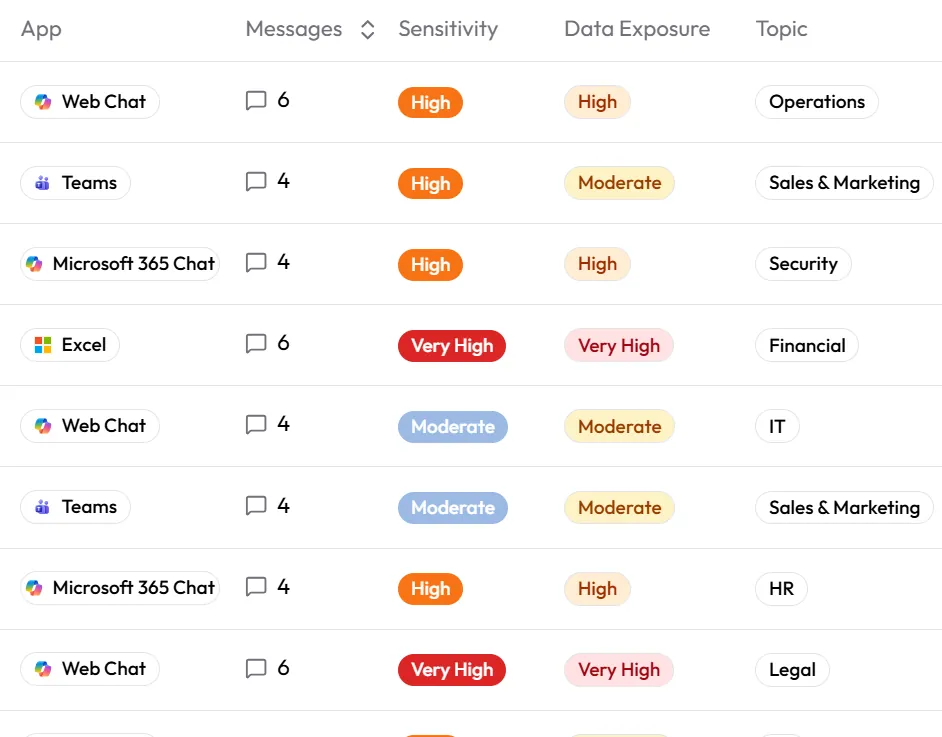
Each conversation is classified by sensitivity and data exposure and filterable by topic and regulated data, so Copilot's transcripts become a running record of what the tenant exposes.
04
Browser AI tools
Before AI
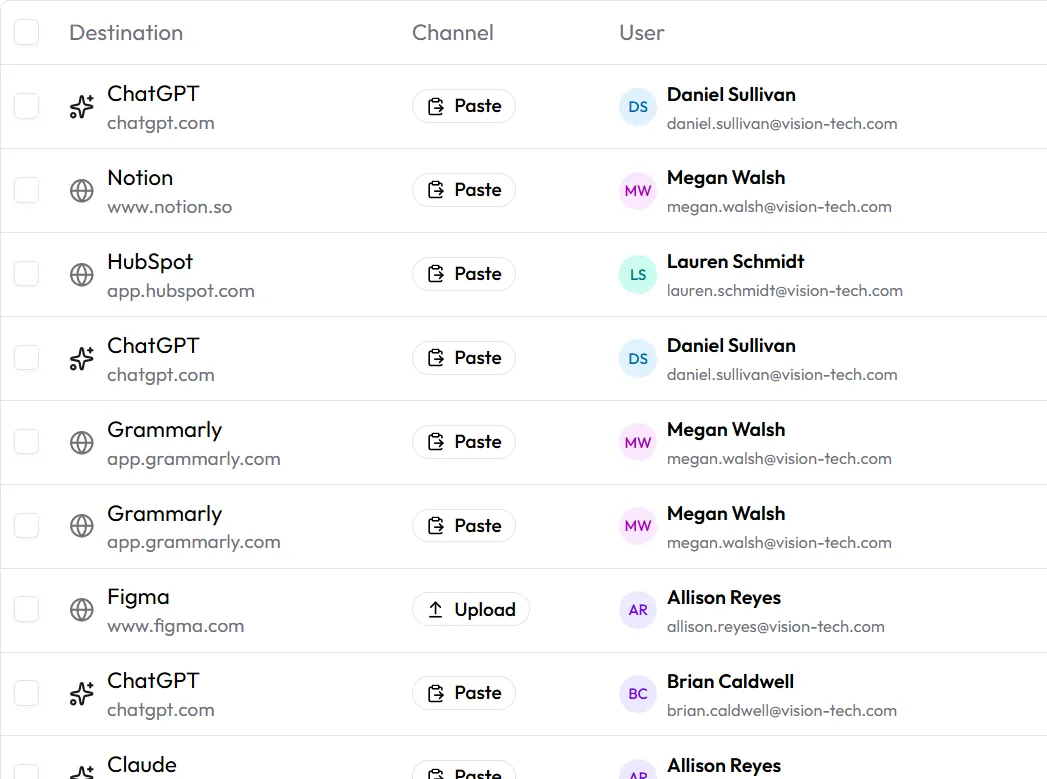
A contract pasted into ChatGPT is a copy outside the tenant, and nothing inside Microsoft 365 records that it happened.
With Cyflow
The Chrome and Edge extension records what leaves — destination, channel, sensitivity — and blocks a sensitive paste or upload before it lands.
05
Tenant configuration
Before AI
Anonymous sharing links get re-enabled. Copilot content-discovery restrictions get switched off. The change surfaces at the next audit, if it surfaces at all.
With Cyflow
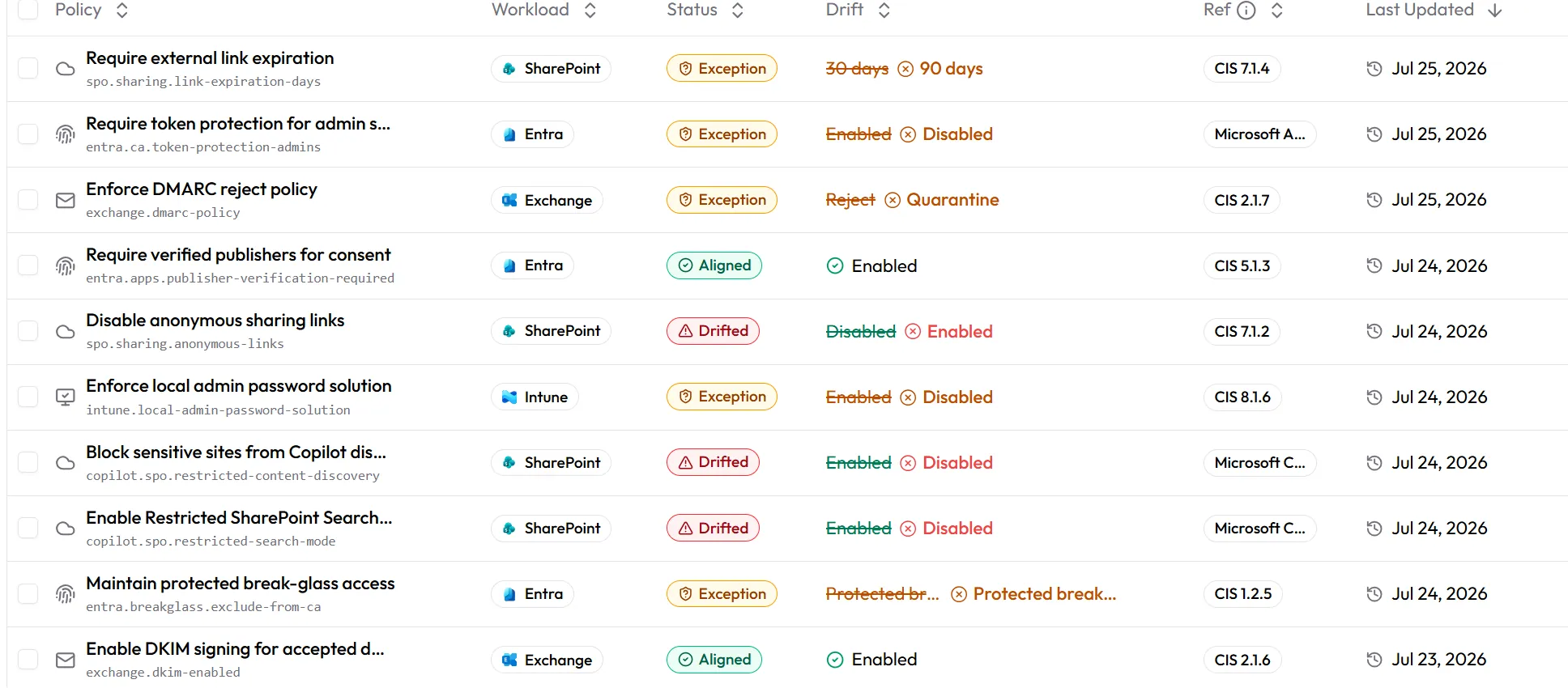
Baselines hold a desired state per workload and show each drift with its CIS reference, its previous value, and what it is now.
Platform
One console, whatever the channel
Inventory, classification and remediation work the same way whether the finding is a Copilot conversation, an OAuth grant, or a SharePoint link.
Shadow AI
Find and revoke connected AI apps
Every OAuth-connected application with delegated access, scored on AI exposure, data access and publisher trust. Revoke from the same table you found it in.
Copilot
Govern Copilot conversations
Sensitivity and data-exposure classification on Microsoft 365 Copilot, filterable by topic and regulated data.
Browser
Govern extensions, stop the paste
Authorize extensions per browser, and block sensitive paste or upload to AI assistants and private destinations like WhatsApp Web and personal Gmail.
Baselines
Hold the tenant to a desired state
SharePoint, Entra, Exchange, Teams and Intune settings compared against approved baselines, with the drift and its CIS reference on the row.
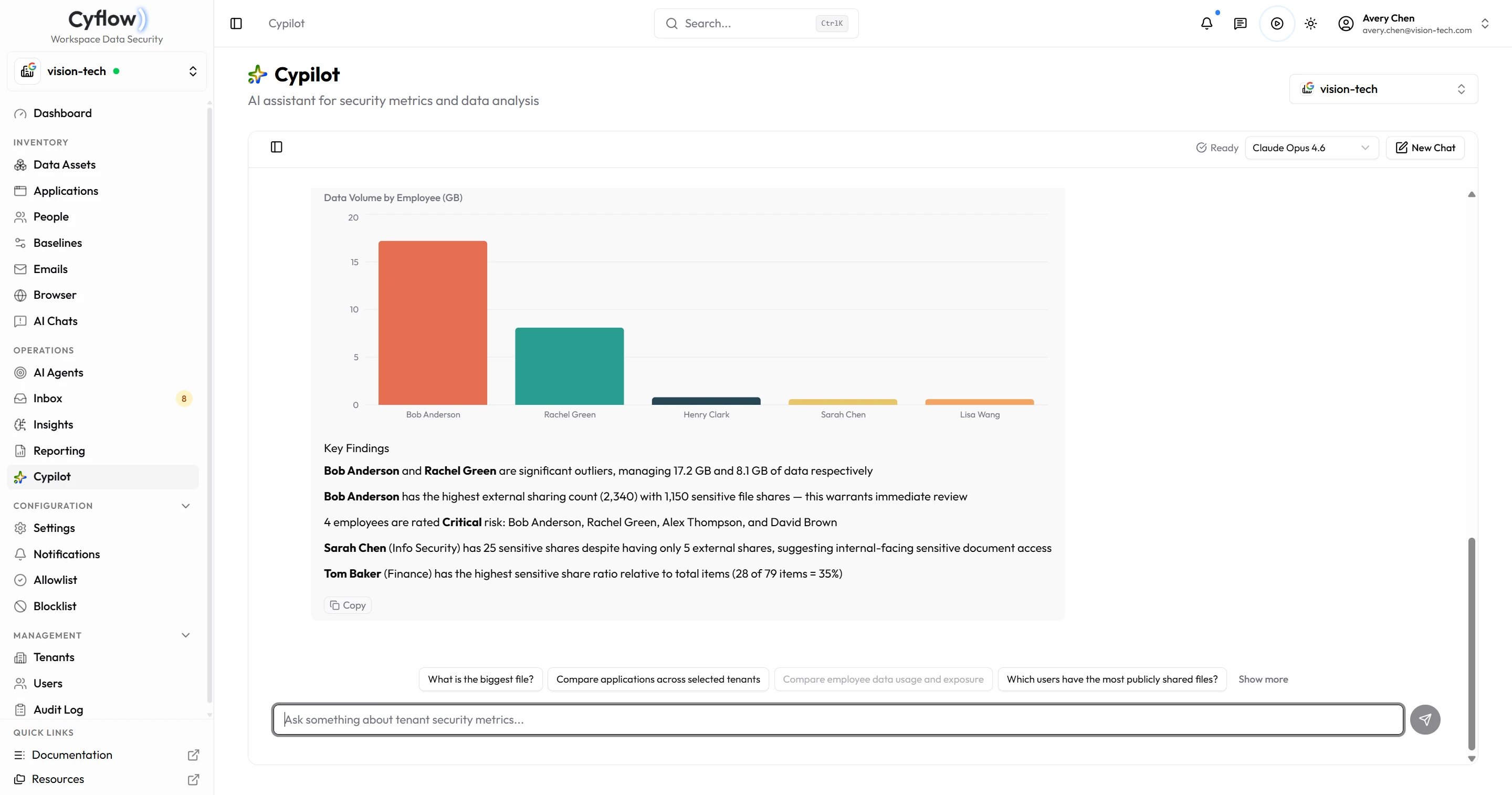
Cypilot
Ask the tenant a question
Ask in plain language across one tenant or many, and get a source-backed answer as a table or chart — no query builder, and every question scoped to the tenants you can see.
Before you connect a tenant
What the platform reads, and what it does not.
What does Cyflow connect to?
Microsoft Graph and Entra cover the Microsoft side. Domain-wide delegation covers Drive, Shared Drives, Gmail and the directory on Google Workspace. Copilot conversations are read on the Microsoft side; on Google, Cyflow reports what Gemini would be able to reach rather than what anyone typed into it.
Does anything install on employee laptops?
There is no endpoint agent. Connecting a tenant is an admin consent and a set of scopes. The one exception is the Chrome and Edge extension that covers the browser channel, and it is optional.
Can Cyflow change things in our tenant?
Only with write scopes you grant and an authority you set. Read scopes come first. Each agent then runs as Monitor, Request Approval, or Auto-remediate — anything not pre-approved waits in the approval inbox with the entity, the agent that raised it, and when it was detected.
Does one console cover more than one tenant?
Yes. One dashboard spans every tenant you manage, agent presets apply across all of them at once, and reports can carry your own logo per client.
What is Cyflow not?
It is not a SIEM, an endpoint platform, device management, an enterprise browser, or a generic compliance suite.
Connect a tenant
See it in your environment
Book a demo and we will walk the console channel by channel. Or start with the assessment and keep the report either way.