

Browser AI Security
The browser is where AI gets the data
Most AI at work never reaches a consent screen. It is an extension somebody installed, or a tab somebody pasted a contract into. The Cyflow extension for Chrome and Edge governs both: which AI extensions may run, and what is allowed to leave in a paste or an upload.
The gap
Nothing in the tenant sees this
Tenant-side controls govern grants, sharing and configuration. None of them see a paste. The OAuth side of shadow AI is covered on shadow AI; these three belong to the browser.
Extensions read the page
An AI assistant extension asks for permission to read and change data on the sites you visit, then keeps it. Whatever is on screen — a customer record, a salary table — sits inside its reach for as long as it stays installed.
A paste leaves no trace
Text lifted out of a document and dropped into a chat window is a copy outside the tenant, made without touching a share, a link or an attachment. No audit log records it.
Work data, personal destinations
A file dropped into a personal Gmail account or a WhatsApp Web tab leaves the tenant through the same browser channel as a paste into ChatGPT — the same blind spot, governed by the same control.
The controls
See it, authorize it, or stop it
The extension is the one client-side component Cyflow ships. There is no endpoint agent behind it, and it covers the browser channel only.
01
Inventory what is installed
Every extension across Chrome and Edge in the tenant, with the permissions it holds and whether it is an AI assistant. ChatGPT, Claude and Perplexity extensions surface with their AI exposure rating rather than as generic browser add-ons.
02
Authorize, or make them ask
Soft-disable the extensions you have decided against, and give the employee a Request Approval path instead of a dead end — the same pattern as privileged access management. The request arrives with who asked, for which extension, and why.
03
Block the sensitive paste, teach in the moment
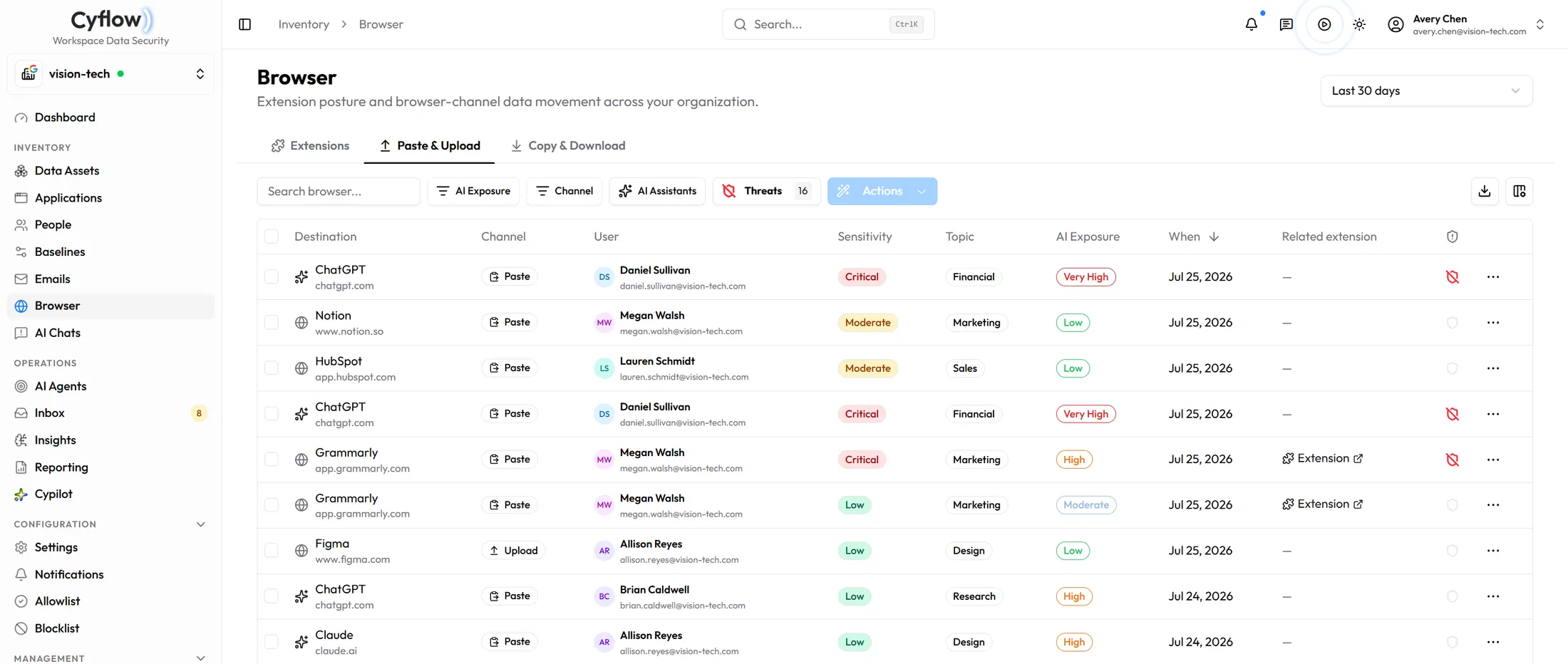
Paste and upload to AI assistants such as ChatGPT and Claude, and to private destinations such as WhatsApp Web and personal Gmail, are recorded with destination, channel, user and sensitivity — and stopped before they land when the content is sensitive. With education turned on, the person is told in the moment why it was stopped and how to handle it, instead of waiting for the next training cycle.
How the extension behaves
What it covers, and what it leaves alone.
Is there an endpoint agent?
No. The Chrome and Edge extension is the only client-side component Cyflow ships, and it covers the browser channel. Everything else in the platform runs against Microsoft 365 and Google Workspace APIs.
What happens when somebody tries to use a blocked extension?
It is soft-disabled rather than quietly removed, and the person is offered a Request Approval path. The request reaches an approver with the extension, the person and the reason attached, so the answer is a decision rather than a help-desk ticket.
Does blocking a paste mean reading everything people type?
The control evaluates the content being pasted or uploaded against the destination it is heading for, so a paste into an approved internal tool is not treated like a paste into a consumer AI assistant. What is kept on the event is the destination, the channel, the user and the sensitivity — the basis for the decision, not a transcript.
Can the same rules cover WhatsApp Web and personal Gmail?
Yes. Private destinations run through the same paste and upload controls as AI assistants. The destination changes; the mechanism does not.
Which browsers are supported?
Chrome and Edge. Browsers without the extension are outside this control — the tenant-side channels still apply to them, but paste and upload do not.
Close the browser gap
The channel with no audit trail
Book a demo and we will walk the extension inventory, the approval request path, and a blocked paste.