

Autonomous Remediation
Findings that end in a changed permission
A dashboard that counts problems is not a control. Cyflow agents carry each finding through to the change that closes it — narrowing a link, revoking a grant, correcting a setting — at exactly the level of autonomy you granted them and nowhere past it.
The actions
What an agent does when it fires
Autonomy only means something if there is a real change at the end of it. These are the changes, one per channel, and each of them is the thing a person would otherwise be doing by hand.
Narrow a link
An Anyone-with-the-link permission on regulated content is removed, and access is granted to the people who actually needed it.
Revoke a grant
An OAuth application that failed review loses its delegated access to the tenant, from the row it was found on.
Correct a setting
A drifted Microsoft 365 policy is returned to the baseline value it was meant to hold, with the previous value kept on the record.
Stop a destination
A paste or upload heading for an AI assistant or a personal account is blocked in the browser before it completes.
Reach the owner
The person who created the exposure hears about it while it is still fresh, with what they shared and why it matters, rather than at the next training cycle.
Close it out
Findings reviewed and accepted are marked safe or allowlisted, so they stop consuming attention on every run afterwards.
Trusting the agents
What changes, who allows it, and what is left behind.
Can we run this without letting anything change automatically?
Yes, and most tenants start exactly there. Set every agent to Monitor, watch the queue for a few weeks, then promote the ones whose judgment you agree with to Request Approval.
What is in the approval inbox?
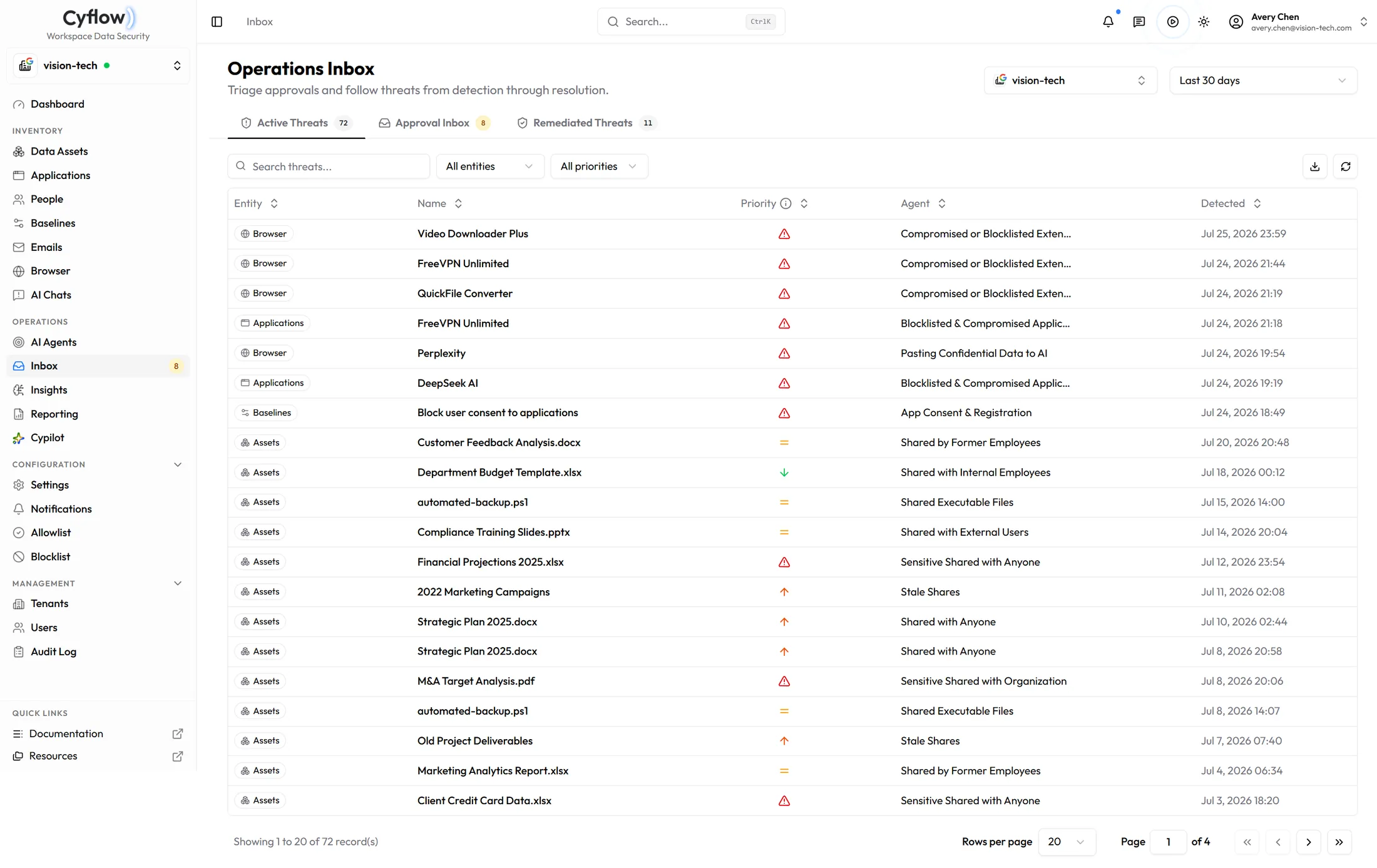
The findings waiting on a person: the entity involved, the agent that raised it, when it was detected, and which channel it came from — browser, applications, baselines or data assets — in one queue rather than one queue per module.
Is any of this irreversible?
Remediation changes permissions, grants and settings, which is the point of it. The action sits on the row before you approve it, and baselines offer a dry-run when you want to see the change before it happens.
What is left behind after a change?
The record carries the agent that acted, the authority it was running under, and the person who approved it. That is what turns a remediation into something you can explain to an auditor months later.
Can we write our own agents?
Yes. Built-in agents ship as presets, from monitor-only through to strict remediation, and custom agents cover the policies specific to your organization.
Past the dashboard
Counting problems is not a control
Book a demo and we will run a finding end to end — raised by an agent, held for approval, applied, and recorded.